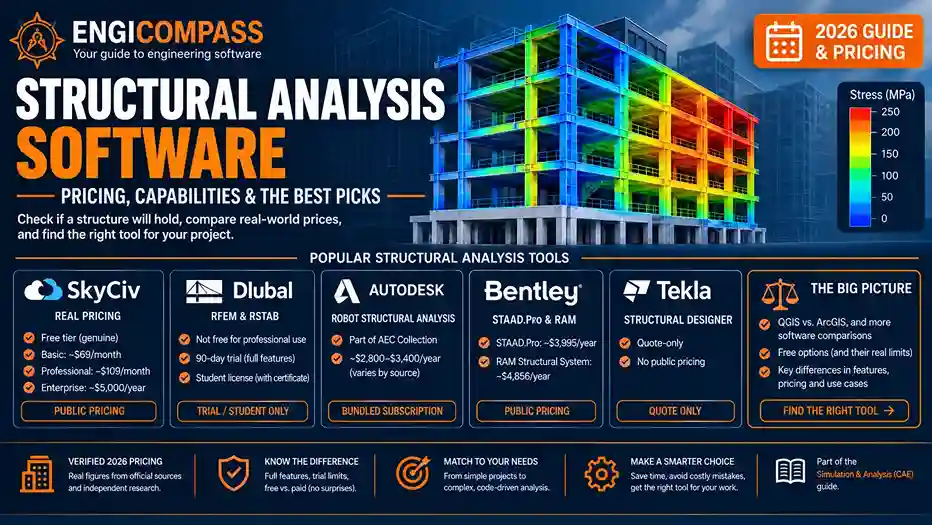
Structural analysis software helps engineers check whether a real structure — a beam, a bridge, a building frame — can actually handle the loads it’ll face: gravity, wind, seismic forces, people and equipment inside it. It’s covered in more depth as part of the broader CAE software guide. Every vendor page explains the concept well. Almost none of them tell you what the software costs, or which of the “free” options are genuinely free versus just a trial with a countdown clock. This guide covers both.
Structural analysis software — the quick answer:
- SkyCiv is a real, browser-based option with genuinely public pricing: a free tier exists, Basic starts around $69/month, Professional runs about $109/month, and Enterprise runs around $5,000/year — all three figures confirmed consistently across three independent sources.
- Dlubal’s RFEM and RSTAB are not free software, despite “Free Zone” branding — it’s a full-featured 90-day trial, plus a separate license restricted specifically to enrolled students with a valid certificate.
- Autodesk’s Robot Structural Analysis Professional isn’t standalone or quote-only — it comes bundled with the AEC Collection subscription, roughly $2,800-$3,400/year with real variance by source. Bentley’s STAAD.Pro and RAM Structural System are also genuinely priced in public (roughly $3,200-$4,900/year depending on source and product), leaving Tekla Structural Designer as the one tool here that’s genuinely quote-only.
- STAAD.Pro and SAP2000 remain the two most commonly paired tools in real structural engineering job postings, with STAAD leaning industrial/EPC work and SAP2000 leaning general building, seismic, and bridge work.
By Jordan Lee · Last updated: August 2026
What does structural analysis software actually do?
In plain terms, it checks whether a structure will hold up under real forces before anyone builds it. You describe the structure’s geometry, the materials it’s made from, and the loads acting on it — gravity, wind, seismic activity, people and equipment. The software calculates how it bends, where stress concentrates, and whether it stays within safe limits. Getting this wrong in the real world means a structure that fails. Getting it wrong on paper first is cheap and safe by comparison.
Finite element analysis (FEA) is the method most of this software actually runs on underneath. A structure gets broken into thousands of small, simple pieces a computer can solve. The results then get combined into a full picture — see the finite element analysis guide for how that method works in more depth, since it applies well beyond just structures.
This is closely related to, but distinct from, general CAD and BIM work. AutoCAD, for example, isn’t built to perform structural calculations at all. A model gets created there, then imported into dedicated structural analysis software to actually run the numbers. Civil 3D and Revit handle the design and documentation side. Structural analysis software handles the “will it actually hold up” question specifically — see the CAD software guide for how these pieces fit together.
What does structural analysis software actually cost?
SkyCiv is genuinely the most transparent option here, and its pricing is public, not quote-based. A free tier exists for basic use. Paid tiers run $69/month for Basic and $109/month for Professional, with an Enterprise tier around $5,000/year — all three figures confirmed consistently across three independent sources. The tiers aren’t just about usage limits either. Basic covers analysis only, while Professional specifically adds real design-code compliance checking (AISC, ACI, NDS, Eurocode), confirmed directly on SkyCiv’s own pricing page.
Dlubal’s RFEM and RSTAB aren’t actually free, despite branding that might suggest otherwise. The real offer is a 90-day trial with full functionality, not a permanent free tier. A genuinely free license does exist, but it’s restricted specifically to enrolled students at technical colleges or universities, and requires a valid certificate of enrollment. Dlubal’s own support page states plainly that no equivalent free option exists for anyone else. One detail worth knowing if you’re a student specifically: Dlubal extends that free full-version license for a further 6 months after graduation, plus a small thank-you voucher, confirmed directly on their own education page.
Autodesk’s Robot Structural Analysis Professional isn’t sold as a standalone product at all, and it isn’t quote-only either. It comes bundled specifically through Autodesk’s AEC Collection subscription, alongside AutoCAD, Revit, Civil 3D, and dozens of other tools. Real pricing trackers put that collection at roughly $2,800-$3,400 per user per year, with some genuine variance between sources. Get a current quote for your specific situation rather than assuming a single figure, since Autodesk’s own pricing has been rising a few percent year over year.
Bentley’s STAAD.Pro and RAM Structural System are also genuinely priced in public, not quote-only. Bentley’s own official store lists STAAD.Pro starting around $3,995/year and RAM Structural System around $4,856/year. G2 independently shows similar figures in the same range for both. Tekla Structural Designer remains the one tool here that’s genuinely quote-only, with no published price found anywhere.
STAAD.Pro and SAP2000 deserve a specific mention, since they show up constantly together in real job postings for this field, and their pricing situations turn out to be genuinely different. STAAD.Pro has real, public pricing, as already covered above. SAP2000, made by a separate company (CSI), remains genuinely quote-only. CSI’s own sales page directs buyers to a custom sales inquiry, with no published figure found anywhere. Beyond price, they’re worth knowing by name specifically: STAAD leans toward industrial and EPC (engineering-procurement-construction) work, while SAP2000 leans toward general building design, seismic analysis, and bridges. Many senior structural engineers know both.
When do you actually need dedicated structural analysis software?
Simple, standard structures with well-established rules of thumb often don’t need dedicated software at all. A lot of residential and small-commercial structural work still runs on hand calculations or spreadsheet tools. This is especially true where a licensed engineer already has established, code-compliant methods memorized.
Complex geometry, unusual loading, or anything code review will scrutinize closely is where dedicated software earns its cost. Multi-story buildings, bridges, anything with irregular geometry or seismic risk all benefit from software that can produce a defensible, documented analysis. So does anything a building department or client’s engineer will independently check.
Team size and file-sharing needs point toward specific tool choices, not just whether to use software at all. A single engineer working independently has different needs than a firm running the same models through multiple reviewers. This is where dedicated tools’ collaboration and reporting features actually start mattering.
Common mistakes to avoid
Assuming “Free Zone” or similar branding means a permanent free tier. Read the actual terms — a 90-day trial and a student-only license are both real and useful, but neither is the same as a genuinely free-forever tool like SkyCiv’s basic tier.
Buying enterprise-tier software for work a browser-based tool like SkyCiv would handle. The gap in raw analysis capability is smaller than the price gap suggests for a lot of standard structural work. Confirm what your specific project actually needs before assuming you need the expensive option.
Treating STAAD.Pro and SAP2000 as interchangeable. They’re both real, respected tools, but they lean toward different kinds of work — industrial/EPC versus general building and seismic work specifically. Check which matches your actual project type.
Not checking your school or employer’s existing access before paying for anything. Dlubal’s genuine student license, and many firms’ existing enterprise licenses, cover real work at no additional personal cost. Confirm what’s already available before assuming a new purchase is necessary.
FAQ
Is SkyCiv actually free, or is that just a trial? It’s a genuine free tier, not a time-limited trial, confirmed independently across multiple sources. Paid tiers add capability on top for around $69-$109/month depending on the level.
Is Dlubal’s RFEM or RSTAB free for professional use? No. The free options are a 90-day full trial and a student-only license requiring proof of enrollment — professional use requires a paid license.
What’s the real difference between STAAD.Pro and SAP2000? Both are respected, widely-used tools, but STAAD leans toward industrial and EPC work while SAP2000 leans toward general building design, seismic analysis, and bridges. Many senior engineers use both depending on the project.
Do I need structural analysis software for a simple residential project? Often not — many residential and small-commercial structural jobs still run on hand calculations or spreadsheet-based methods, particularly where a licensed engineer already has established, code-compliant approaches. Dedicated software earns its cost more clearly on complex or heavily-scrutinized projects.
How does structural analysis software relate to FEA specifically? Most structural analysis software runs on the finite element method underneath — breaking a structure into small, solvable pieces and combining the results. See the finite element analysis guide for how that method works in more general depth.