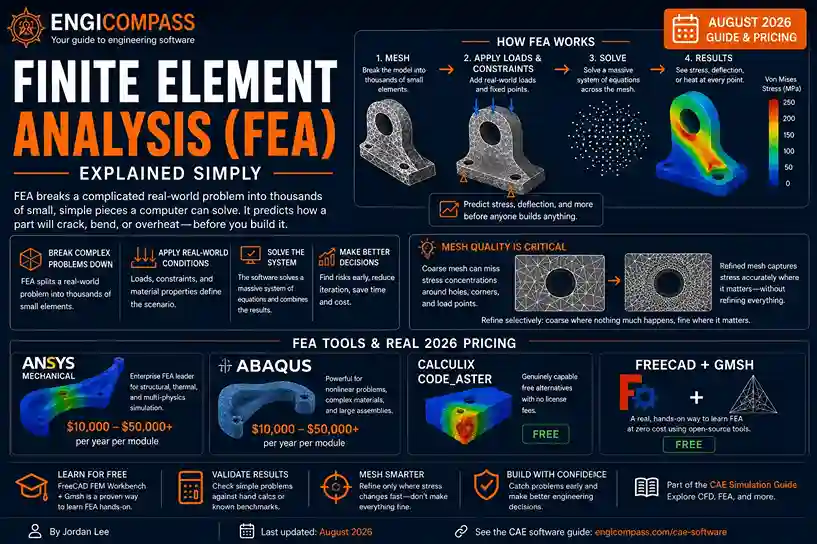
Finite element analysis breaks a complicated real-world problem into thousands of small, simple pieces a computer can actually solve. Instead of one impossible equation for an entire bridge bending under load, FEA solves a huge number of tiny, manageable equations, one per piece. It then combines them into a full picture. Engineers use it to predict whether a part will crack, bend, or overheat, before anyone builds it.
Finite element analysis — the quick answer:
- FEA divides a 3D model into a mesh of small elements. It applies real-world loads and constraints, then solves for stress, deflection, or heat at every point in that mesh.
- Enterprise FEA tools like ANSYS Mechanical and Abaqus cost $10,000 to $50,000+ per year per module. CalculiX and Code_Aster are genuinely capable free alternatives.
- FreeCAD’s FEM Workbench, paired with the free mesher Gmsh, is a real, hands-on way to learn FEA at zero cost.
- FEA is one part of the broader CAE category — see the CAE software guide for how it fits alongside CFD and multi-physics simulation.
How does finite element analysis actually work?
Picture a diving board. Figuring out exactly how it bends when someone jumps on it, with one giant equation covering the whole board at once, is genuinely hard. FEA takes a different approach entirely. It breaks the board into hundreds of small pieces, called elements, connected at points called nodes. Each element is simple enough to solve on its own.
That collection of elements and nodes is called a mesh. Once the mesh exists, you apply real-world conditions. A fixed point represents where the board bolts to the pool deck; a load represents where someone’s feet land. The software solves a large system of equations, one set per element. Then it stitches the results back into a complete picture: exactly where stress concentrates, how far the tip deflects, whether anything exceeds the material’s limits.
Why mesh quality is the whole game
A coarse mesh, with fewer and larger elements, solves fast but misses detail in areas where stress changes sharply. A fine mesh captures that detail but costs real computing time. Most real FEA work refines the mesh selectively — coarse where nothing much is happening, fine around holes, corners, and load points where stress concentrates. Get this wrong, and the software still produces a result. That result just isn’t trustworthy.
A concrete example makes this click faster than the general rule does. A flat bracket with a bolt hole in it looks simple. That hole, though, is exactly where stress concentrates under load. A coarse mesh there can miss a stress spike by a wide margin, reporting the bracket as safe when a real one would crack at that exact hole. The fix isn’t refining the whole bracket uniformly. It’s refining specifically around that hole, while leaving the flat, unloaded sections of the mesh coarse. That’s the actual skill in FEA work: knowing where the mesh needs to be fine, not making everything fine by default.
What does finite element analysis actually test?
Structural problems dominate FEA’s use: will this bracket crack, will this beam deflect too far, does this part survive the vibration it sees in the field. Thermal problems use the same underlying math. Heat moving through a part and stress spreading through a part both come from solving equations across the same kind of mesh.
Real applications span industries most people don’t think about until something fails. A bridge’s structural engineer runs FEA to confirm it holds the loads it’s rated for. An automotive engineer runs it to confirm a chassis survives a crash. A consumer electronics team runs it to confirm a phone case doesn’t crack from a one-meter drop. All three are the same underlying method, applied to different problems.
FEA vs. FEM — what’s the difference?
FEM (the Finite Element Method) is the underlying mathematical technique. FEA (Finite Element Analysis) is what engineers call the practical act of applying that technique to a real design problem. In everyday use, most engineers say the two interchangeably, and most software documentation does too — the distinction rarely matters outside a genuinely academic context. If a course or textbook is teaching the method itself, it’s usually called FEM. If a tool or workflow is solving a real part, it’s usually called FEA.
What do FEA tools actually cost?
FEA sits inside the broader CAE category, and pricing follows the same pattern already established there. ANSYS Mechanical and Abaqus lead the enterprise tier. Individual modules typically run $10,000 to $50,000 per year. Both are sold through a direct sales process or an authorized channel partner — expect “contact sales” or a reseller quote, not a fixed sticker price.
CalculiX and Code_Aster are the standard free alternatives, and they’re genuinely capable, not stripped-down demos. Code_Aster specifically was developed by EDF, France’s national electricity utility, for its own real engineering analysis — not built as a teaching tool. Both use the same underlying mesh-and-solve math as the paid tools.
Ansys itself also offers a free student path. Ansys Student is a real, renewable download, typically a student account signup with an occasional university email check. No campus license server is required. It carries real limits — roughly 128,000 nodes/elements for structural problems — and it’s licensed strictly for educational use, not commercial work.
How do you learn finite element analysis for free?
FreeCAD’s FEM Workbench, paired with Gmsh as the mesh generator, is a genuinely real way to run actual FEA problems at zero cost. It’s not a simplified teaching version — it runs the same open-source solvers, including CalculiX under the hood, that produce real, usable results elsewhere. This combination is worth knowing by name specifically. It rarely gets mentioned outside CAD-focused communities, despite being one of the most accessible real entry points into hands-on FEA.
The most useful first step for anyone learning FEA isn’t picking a tool at all. It’s validating a simple result by hand first. Run a basic beam problem in whichever free tool you choose, then check it against a hand calculation using standard beam theory. If the numbers land close, that confirms the tool and your setup are both working, before you trust it on something you can’t easily verify by hand.
Common mistakes to avoid
Trusting a result without checking mesh quality first. A coarse or poorly shaped mesh produces a technically complete result that can still be quietly wrong, especially around sharp corners or holes where stress concentrates.
Skipping validation against a known answer. Simulation output is only as trustworthy as the setup behind it. Validate a new workflow against a hand calculation or a known test case before trusting it on a real design decision.
Assuming a finer mesh is always better. Past a certain point, refining the mesh further just costs computing time without meaningfully changing the answer. Refine selectively, in the areas that actually matter.
Confusing FEA capability with CAD-embedded simulation. Tools like SOLIDWORKS Simulation handle basic linear FEA well, covered in the CAD software guide. They stop short of the nonlinear analysis and advanced material models a dedicated FEA tool provides.
FAQ
Is FEA hard to learn? The basic workflow — build geometry, mesh it, apply loads, solve, read the results — is learnable in weeks. Knowing when to trust a result, and when something in the setup is quietly wrong, takes real engineering judgment built over months of practice, not just software training.
What’s the difference between FEA and CFD? FEA tests solid structures — stress, deflection, heat conduction, vibration. CFD tests fluid flow — air or liquid moving around or through a design. Both use a similar mesh-based approach, but they solve fundamentally different physics.
Can I run real FEA on a laptop? For small, simple parts, yes. Large assemblies or a fine mesh on complex geometry need real RAM and a strong CPU. Results can genuinely outgrow a laptop’s capacity — see the HPC clusters guide for what running a heavier job on shared university hardware actually looks like.
Do I need to know advanced math to use FEA software? Not to operate the software day-to-day. The software handles the underlying equations. What matters more is engineering judgment: knowing what loads and constraints actually represent the real problem, and recognizing when a result doesn’t pass a sanity check.
Is free FEA software accurate enough for real engineering work? Yes, when set up and validated correctly. CalculiX and Code_Aster use the same class of underlying math as commercial tools. Accuracy depends far more on correct meshing and validation than on which tool produced the number.