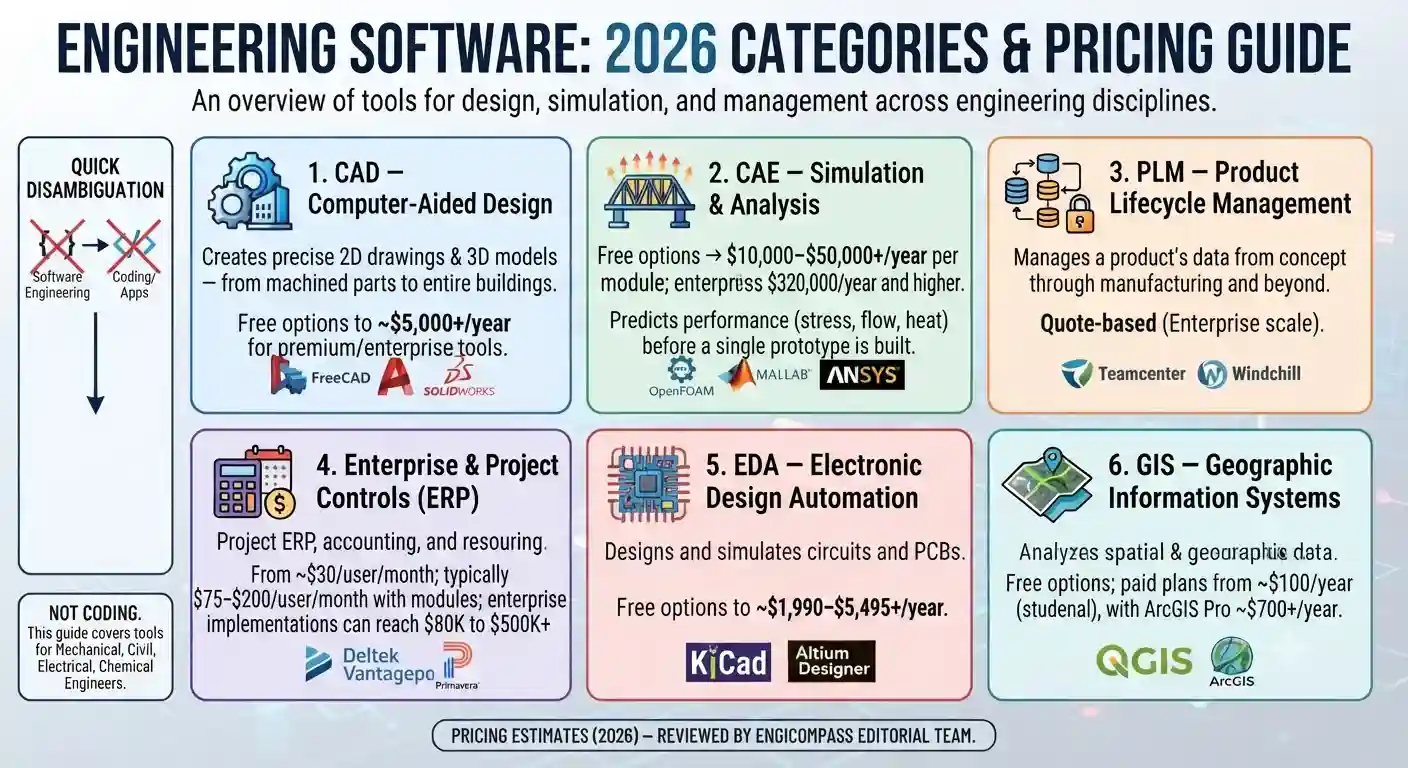
Engineering software is a broad term. It covers every tool engineers use to design, model, test, and manage technical projects. There are six main categories: CAD, CAE, PLM, enterprise/project tools, EDA, and GIS. Which one you need depends on your discipline, your budget, and your experience level. This guide breaks down what each category does, what it actually costs in 2026, and how to choose between them.
All prices below are US list prices in USD, before reseller discounts or negotiated volume terms.
Quick Disambiguation: Engineering Software vs. Software Engineering
This page is not about becoming a software engineer — that’s a coding career path, and a separate discipline entirely. Engineering software means something different. It’s the tools that engineers use to do their work. Same-sounding name, different topic. Worth clearing up early, since the two get mixed up constantly in search results.
The 6 Major Categories of Engineering Software
1. CAD — Computer-Aided Design
CAD software turns a design idea into a precise 2D drawing or 3D model. It works at any scale, from a single machined part to an entire building. Nearly every engineering discipline starts here.
Who uses it: Almost everyone — mechanical, civil, structural, architectural, and product design teams.
Real pricing (2026):
| Tier | Example | Typical cost |
|---|---|---|
| Free | FreeCAD, SketchUp Free | $0 |
| Entry | SketchUp Go, Autodesk Fusion | $129–$690/year |
| Professional | AutoCAD, SOLIDWORKS Standard | ~$2,150–$2,940/year (AutoCAD); SOLIDWORKS from $846 per 3-month term, ~$2,800–$3,500/year annualized |
| Premium/Enterprise | SOLIDWORKS Premium, perpetual licenses | $5,000+/year, or $4,195+ upfront for a perpetual seat |
Prices vary by region, contract length, and seat count. Treat these as estimates, not final quotes.
2. CAE — Simulation & Analysis
CAE stands for Computer-Aided Engineering. This software predicts how a design will actually perform: stress, heat, airflow, vibration. You test the design on screen before cutting metal, which catches expensive mistakes while they’re still cheap to fix. FEA (finite element analysis) and CFD (computational fluid dynamics) both live in this category.
Who uses it: Mechanical, aerospace, automotive, and structural engineers — anyone who has to prove a design works before it’s built.
Real pricing (2026):
| Tier | Example | Typical cost |
|---|---|---|
| Free | OpenFOAM, Code_Aster, GNU Octave | $0 |
| Accessible | MATLAB (individual annual) | ~$860–$1,050/year; a non-commercial Home license runs closer to $165/year |
| Professional | COMSOL Multiphysics | Perpetual licenses starting around $10,995 |
| Enterprise | ANSYS | Individual modules from roughly $10,000–$50,000; typical enterprise deployments average around $320,000/year and can reach into seven figures |
CAE has the widest price gap on this list, from student-accessible to full enterprise.
3. PLM — Product Lifecycle Management
PLM platforms like Windchill and Teamcenter track a product’s data from first concept through manufacturing and into service. Think of it as version control, but for physical products.
Who uses it: Product development teams at manufacturing and industrial companies, usually mid-size and up.
Real pricing (2026): PLM vendors quote privately. Neither Windchill nor Teamcenter publishes list prices, and cost scales heavily with user count and modules. Expect a sales conversation, not a pricing page.
4. Enterprise & Project Controls / ERP
This category covers project-based ERP (enterprise resource planning), accounting, and resource planning, all built specifically for engineering and professional services firms. The two names you’ll run into most are Deltek Vantagepoint and Oracle Primavera.
Who uses it: Engineering, architecture, and consulting firms managing billable projects and staff utilization. In the US, firms doing federal contract work often end up on Deltek Costpoint specifically for DCAA-compliant job costing.
Real pricing (2026): Transaction data puts Vantagepoint around $30 per user per month at the low end. Add functional modules, and that climbs to roughly $75–$200 per user per month. Larger Costpoint deployments (50–100 users) are harder to pin down — independent market analyses put total implementation somewhere between $80,000 and half a million dollars, depending on what’s bundled in: deployment support, add-on modules, compliance work. Be skeptical of any vendor who gives you one exact number without knowing your setup.
5. EDA — Electronic Design Automation
EDA tools are used to design and simulate electronic circuits and printed circuit boards.
Who uses it: Electrical and computer engineers, hardware/embedded teams.
Real pricing (2026):
| Tier | Example | Typical cost |
|---|---|---|
| Free | KiCad | $0 |
| Entry | Altium Develop | From ~$1,990/year — a $995/year workspace subscription plus $995/year per Author seat. Additional Authors run $995 each, up to five concurrent |
| Professional | Altium Designer (higher tiers) | Roughly $3,500–$7,500 per seat per year, depending on tier and volume |
| Cloud | Altium 365 | Around $2,500–$5,000 per user per year for standard tiers; enterprise negotiated separately |
Worth knowing: Altium has moved away from perpetual licensing. Older perpetual seats ran roughly $6,000–$9,000 upfront plus 15–22% annual maintenance, but buyers report those options being withdrawn in favor of subscriptions. If you’re comparing against a quote from a few years ago, the licensing model itself has changed, not just the price.
6. GIS — Geographic Information Systems
GIS software maps and analyzes spatial data. Civil and environmental engineers rely on it for site planning, infrastructure, and environmental impact work.
Who uses it: Civil, environmental, and transportation engineers; urban planners. Esri’s ArcGIS is effectively the default across US state DOTs and municipal governments.
Real pricing (2026): Esri’s ArcGIS pricing scales with tier. Personal and student subscriptions run around $100/year. ArcGIS Pro desktop licenses start at around $700/year and go up from there. QGIS, the open-source alternative, is free and widely used in professional work.
Free vs. Paid Engineering Software: What You Actually Get
Every category above now has a genuinely usable free tier. That wasn’t true a decade ago. Here are the honest trade-offs:
- Free/open-source (FreeCAD, OpenFOAM, KiCad, QGIS, Octave): These are real, capable tools, not toys. What you give up is polish, official support, and a few advanced features. For students, hobbyists, and most personal projects, free is enough.
- Student licenses: These aren’t the same as “free.” Most major vendors — Autodesk, Dassault, MathWorks — give you a full or near-full version while you’re enrolled, verified through a .edu email or a service like SheerID. One thing to know: access usually ends at graduation, sometimes with a short grace period. Many US universities also hold campus-wide MATLAB or SOLIDWORKS licenses, so check with your department before paying for anything.
- Paid: Paying gets you support and faster solvers, but the real reason to pay is file compatibility. The moment you exchange files with a client or contractor locked into a specific vendor, native format support stops being a nice-to-have.
How to Choose the Right Engineering Software
A 60-second self-check:
- What’s your discipline? Mechanical or product design → CAD plus CAE. Civil or structural → BIM-capable CAD (Building Information Modeling), paired with a structural analysis tool. Electrical → EDA. Data-heavy or computational work → start with MATLAB or Python, then add specialty tools.
- Are you a student or a professional? If you’re a student, start free or student-licensed. Don’t buy anything yet. If you’re a professional, match whatever your team or industry already uses.
- What’s your actual budget? If it’s $0, the open-source options above are more capable than most people assume. If it’s an enterprise budget, plan around the real numbers above, not the vendor’s lowest advertised price.
- Cloud or local? Distributed teams tend to prefer cloud tools, like Fusion 360, Onshape, or Altium 365. Regulated or bandwidth-limited environments often still need local installs — and if you’re handling ITAR-controlled or federal contract data, check where the vendor actually stores it before you commit.
Once you know which categories you need, the next question is how they fit together. Our guide to building the right engineering software stack covers real stack examples by role and budget tier.
Engineering Software by Discipline (Quick Reference)
- Mechanical: SOLIDWORKS/Fusion 360/AutoCAD (CAD) + ANSYS/MATLAB (CAE)
- Civil/Structural: Revit/Civil 3D (BIM) + SAP2000/ETABS (structural analysis) + ArcGIS/QGIS
- Electrical: Altium/KiCad (EDA) + MATLAB/Simulink (control systems)
- Chemical/Process: Polymath, Aspen-family tools, MATLAB
- Systems/Aerospace: Requirements management tools + FEA/CFD + PLM
How We Evaluate Engineering Software
Every tool on this site is judged on four things. Current, verified pricing — sourced from vendor pages, published reseller rates, and documented transaction data, and reviewed regularly rather than copied from an old review. Genuine feature comparison, not marketing copy. Real use-case fit — we’ll tell you when a cheaper or free tool is actually the better choice. And licensing reality, including student access and what happens after graduation. We’re not paid by any vendor listed here.
Go Deeper
Start here — How to Build the Right Engineering Software Stack · The Evolution of Engineering Software
CAD & 3D Modeling — Best CAD Software for Mechanical Engineers · AutoCAD vs. SolidWorks · BIM Software for Civil & Structural Engineers
Simulation & Analysis (CAE) — Introduction to FEA Software · CFD Software: A Practical Guide · GNU Octave vs. MATLAB
Enterprise & Project Controls — Deltek & Primavera Alternatives · PLM Software Overview
Free, Student & Open-Source — Best Free Engineering Software for Students · Open-Source CAD & Simulation Alternatives · Free Circuit Design & PCB Software
Frequently Asked Questions
What’s the difference between CAD and CAE? CAD creates the geometry, or the model itself. CAE tests how that geometry performs under real-world conditions like stress, heat, and flow, before it’s built. Most engineers use both — CAD to design, CAE to validate.
Do I need paid software as an engineering student? Usually not at first. Nearly every major vendor offers free student licensing. Open-source tools like FreeCAD, OpenFOAM, and KiCad cover most coursework. Save paid software for when a specific class or employer requires a specific tool.
What engineering software do most companies actually use? It varies a lot by discipline and industry. SOLIDWORKS and AutoCAD dominate mechanical and general design. ANSYS leads enterprise simulation. Deltek is the default for AEC project financials in the US. There’s no single universal answer — see the discipline breakdown above.
Is free/open-source engineering software actually good enough for real work? For learning and most individual projects, yes. Where it usually falls short is official vendor support and some advanced solvers. The most common issue is file compatibility with whatever a client or employer already uses.
How often is the pricing on this page updated? We review pricing-heavy pages regularly, because software pricing changes often enough that anything stale isn’t reliable. Treat the numbers above as accurate as of this page’s last-updated date. For anything mission-critical, verify directly with the vendor.