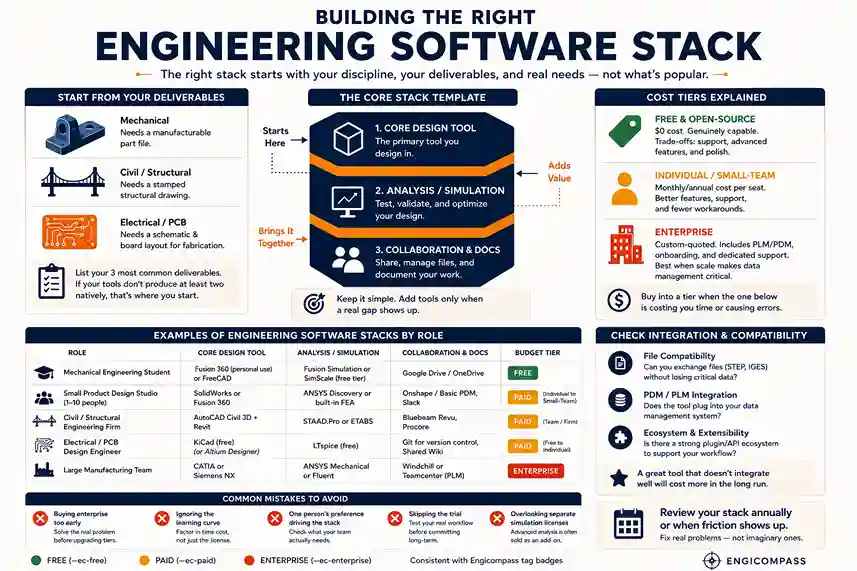
An engineering software stack is the set of tools you use together to design, test, document, and manage a project — not just one CAD program. The right stack starts with what your discipline actually needs, not what’s popular. Build outward from a core design tool, and only add analysis or collaboration tools when a real gap shows up.
By the Engicompass Team · Last updated: August 2026
If you’re still mapping which categories your work actually touches — CAD, CAE, PLM, and the rest — start with our full engineering software guide before building a stack around them.
What does your discipline actually need?
Start from the deliverable, not the tool. A mechanical engineer needs a manufacturable part file. A civil engineer needs a stamped structural drawing. An electrical engineer needs a schematic and a board layout a fab house can actually build from. Work backward from that output, and the right category of tool becomes obvious.
This sounds simple, but it’s where most stacks go wrong. Teams often pick whatever tool their last job used, or whatever a popular forum thread recommended, without asking whether it produces the deliverable they actually need. A civil firm running mechanical CAD software because “it’s the industry standard” is solving the wrong problem — it’s a standard for a different industry.
A quick gut check: list your three most common deliverables. If your current tools don’t produce at least two of them natively, without a workaround or a manual conversion step, that’s the real starting point for your engineering software stack — not a new feature you saw in a demo.
How much does an engineering software stack cost — free, individual, or enterprise?
An engineering software stack’s cost splits into three rough tiers, and each one buys something different.
Free and open-source tools cost nothing and are genuinely capable — FreeCAD, KiCad, and LTspice all produce real, usable output. What you give up is support, some advanced features (heavy simulation, cloud collaboration, certain file export formats), and polish. Fine for learning, personal projects, or a one-person shop testing an idea.
Individual and small-team subscriptions are the middle tier: a monthly or annual per-seat cost that buys the core design tool plus basic analysis. This is where most freelancers and small studios live. The jump from free isn’t just features — it’s usually better support and fewer workarounds.
Enterprise tiers are custom-quoted, not listed on a pricing page. They bundle CAD with PLM or PDM, include dedicated onboarding and support, and often require a minimum seat count or a multi-year contract. This tier makes sense once you have enough people that version control and change tracking become a real problem — not before.
Don’t buy into a tier because it sounds more professional. Buy into it when the tier below it is actually costing you time or causing real errors.
What do real engineering software stacks look like by role?
Here’s what a working stack looks like for a few common roles. These aren’t the only valid combinations — they’re a starting point to adjust from.
| Role | Core design tool | Analysis / simulation | Collaboration & docs | Budget tier |
|---|---|---|---|---|
| Mechanical engineering student | Fusion 360 (free for personal use — check current eligibility) or FreeCAD | Built-in Fusion simulation, or SimScale’s free tier | Google Drive or OneDrive | Free |
| Small product design studio (1–10 people) | SolidWorks or Fusion 360 | ANSYS Discovery or built-in FEA | Onshape / a basic PDM tool, Slack | Individual to small-team subscription |
| Civil / structural engineering firm | AutoCAD Civil 3D + Revit | STAAD.Pro or ETABS | Bluebeam Revu, Procore | Team / firm subscription |
| Electrical / PCB design engineer | KiCad (free) or Altium Designer | LTspice (free) | Git for version control, a shared wiki | Free to individual subscription |
| Large manufacturing team | CATIA or Siemens NX | ANSYS Mechanical or Fluent | Windchill or Teamcenter (PLM) | Enterprise |
Notice the pattern: the core design tool changes by discipline, but the shape of the stack — one design tool, one analysis tool, one place to collaborate — stays the same across every row. That’s the actual template for your engineering software stack. Fill it in with tools that match your deliverable and your budget tier, not by copying a list.
How do you check integration and compatibility?
Before you commit a tool to your engineering software stack, check three things:
- File compatibility with your collaborators. If a client or contractor works in a different CAD system, check whether you can exchange files through a neutral format like STEP or IGES without losing critical data — dimensions, tolerances, and feature history don’t always survive a round trip.
- PDM/PLM integration. If you’re already using a data management system, check whether a new design tool actually plugs into it, or whether you’ll be uploading and organizing files by hand.
- The plugin and API ecosystem. A tool with a thin plugin ecosystem can leave you stuck writing manual workarounds for tasks a more open tool handles natively.
A tool that’s technically excellent but doesn’t talk to what your collaborators use will cost you more in exported-and-fixed files than it saves in raw capability.
What mistakes do teams make when building an engineering software stack?
- Buying enterprise before you have an enterprise problem. PLM and advanced simulation licenses are expensive and slow to roll out. If your actual problem is “two people emailing files back and forth,” a shared cloud folder or a basic PDM tool solves it for a fraction of the cost.
- Ignoring the learning curve. A free tool that takes three times as long to get productive in isn’t actually cheaper once you count the hours. Weigh the license cost against the time cost, not just the sticker price.
- Letting one person’s preference set the whole team’s engineering software stack. The tool a senior engineer learned ten years ago isn’t automatically the right one for a team hiring new graduates today — check what’s actually taught and used now.
- Skipping the trial. Almost every paid tool offers a trial or a short-term license. Run your actual workflow through it before signing an annual contract, not a generic demo project.
- Forgetting simulation licenses are often separate. Many CAD packages sell core modeling and advanced simulation as separate add-ons, sometimes with per-core licensing for larger analysis jobs. Check this before you budget, not after.
FAQ
How many tools should be in an engineering software stack? There’s no fixed number, but most working stacks land on three to five: one core design tool, one analysis or simulation tool, one collaboration or file-management tool, and sometimes one or two specialty tools for a specific task. More than that usually means overlap you can cut.
Should I start with free tools or pay right away? Start free unless you already know exactly which paid feature you need. It’s much easier to prove you’ve outgrown a free tool — and justify the upgrade cost — than to guess upfront.
What’s the difference between CAD and PLM in an engineering software stack? CAD is the tool you design in. PLM (product lifecycle management) tracks versions, approvals, and changes across a whole project or team. Small teams often don’t need PLM at all; it becomes worth it once file versioning by hand starts causing real mistakes.
How often should I review my software stack? Once a year is reasonable for most teams, or any time you hit a real friction point — a file that won’t open correctly, a collaborator you can’t exchange data with, or a task you’re doing manually that a tool should handle. Don’t switch tools on a schedule; switch when something is actually broken.