CAD software for mechanical engineers splits into two real questions: which tool fits your budget, and which one fits how you actually work. SOLIDWORKS and Fusion 360 lead on adoption; Onshape leads on cloud collaboration; FreeCAD leads on cost. This guide compares all of them on real, current pricing, and gives a direct pick for the situations that come up most.
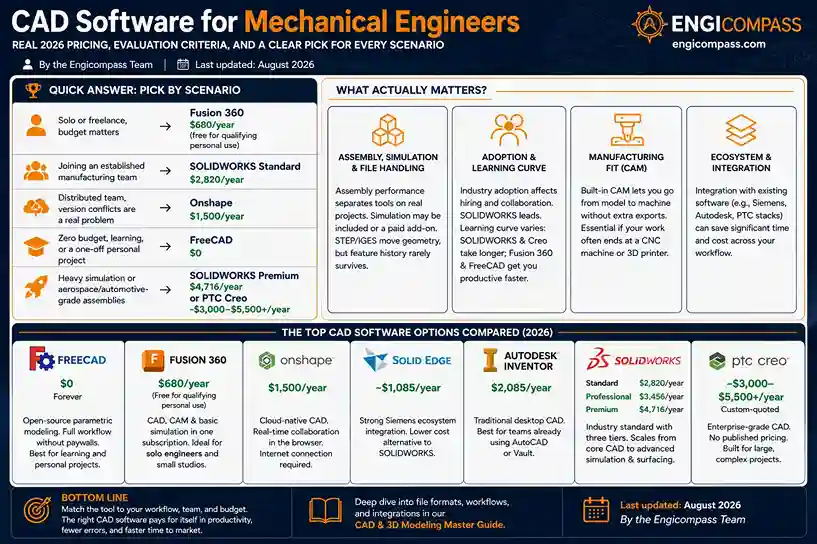
Quick answer:
- Solo or freelance, budget matters: Fusion 360 ($680/year, free for qualifying personal use).
- Joining an established manufacturing team: SOLIDWORKS Standard ($2,820/year) — match what they already run before anything else.
- Distributed team, version conflicts are a real problem: Onshape ($1,500/year).
- Zero budget, learning, or a one-off personal project: FreeCAD ($0).
- Heavy simulation or aerospace/automotive-grade assemblies: SOLIDWORKS Premium ($4,716/year) or PTC Creo (custom-quoted, roughly $3,000–$5,500+/year).
By the Engicompass Team · Last updated: August 2026
What actually matters when evaluating CAD software for mechanical engineers?
Four things decide whether a tool fits, more than any feature checklist does.
Assembly, simulation, and file handling
Assembly performance decides more than any spec sheet does — a tool that’s smooth with a ten-part bracket can choke entirely on a two-thousand-part machine. That’s exactly where budget and premium tools diverge hardest.
Whether simulation comes built into the base price or gets sold separately matters more than it looks like it should. Some tools fold basic stress and motion analysis into the base subscription. Others treat it as a paid add-on, and the real cost of a “cheaper” tool can flip once you tack on the module you needed all along.
Then there’s file compatibility. Exchange files with clients or contractors, and what actually moves cleanly between formats becomes the whole question. STEP and IGES handle basic geometry fine, but parametric feature history almost never survives the trip — a limitation the CAD pillar guide covers in more depth. A “compatible” file that arrives as a dumb solid, with no editable feature tree, often costs more rework time than starting the part from scratch.
Adoption, learning curve, and manufacturing fit
Industry adoption is a cost factor too, not just brand loyalty. SOLIDWORKS’ dominance means a larger pool of trained engineers to hire from, and a format most collaborators already expect going in.
New hires ramp up faster on some tools than others, which is worth weighing against your own learning curve. SOLIDWORKS and Creo both carry real onboarding time. Fusion 360 and FreeCAD get a new user productive sooner.
Last: does the tool carry CAM (computer-aided manufacturing) capability, letting a model go straight to machine instructions without an export step to a separate program? Worth checking directly if your work regularly ends at a CNC machine or 3D printer rather than a drawing.
What are the top picks, one by one?
Here’s how the strongest CAD software for mechanical engineers actually breaks down, tool by tool.
The accessible options
Zero dollars, forever — that’s FreeCAD’s whole pitch. Unlike some “free” tiers, it doesn’t hold back the parametric assembly workflow to push you toward a paid upgrade. Skills carry over cleanly to a commercial package later, since it uses the same feature-based, history-driven approach the paid tools do. What you’re actually giving up is polish and a smaller tutorial library, not core capability — a gap that’s closed noticeably over the past few years.
Where FreeCAD asks you to go without, Fusion 360 asks for $680 a year. It bundles CAD, basic CAM, and basic simulation into that single subscription instead of selling them separately. That bundling is the real reason solo engineers and small studios default to it, not just the number on the price tag.
No install, no local file at all, actually — Onshape runs entirely in a browser. Every change saves and syncs to collaborators the moment you make it, closer to how Google Docs behaves than to how CAD traditionally works. The real cost of that architecture is a genuine internet dependency; there’s no meaningful offline mode to fall back on.
The team and enterprise options
For a company already running other Siemens industrial software, Solid Edge is worth a serious look before anything else on this list — the ecosystem tie-in is real, not a sales pitch. On price alone it undercuts SOLIDWORKS meaningfully too, at roughly $1,085 a year against $2,820.
Same vendor as Fusion 360, genuinely different product. Inventor is Autodesk’s traditional desktop parametric tool. Teams already standardized on AutoCAD or Vault tend to get tighter native integration out of it than out of bolting Fusion on top of an existing Autodesk stack.
Ask a mechanical engineer to name a CAD tool off the top of their head, and SOLIDWORKS is the likely answer. Three tiers — Standard, Professional, Premium — scale from core parametric modeling up through integrated simulation and advanced surfacing. All three share one file format and interface, so moving up a tier later never means relearning the software.
No published price is itself a signal: PTC sells Creo as an enterprise deployment, not a self-serve subscription. It shows up most often in aerospace and heavy industry, where teams usually pair it with dedicated PLM (Windchill) as part of the package rather than bolting it on afterward.
The last two entries push furthest into enterprise-only CAD software for mechanical engineers, priced and sold accordingly.
Boeing built the 777 — the first fully CAD-designed aircraft — in CATIA, and that’s the level this tool operates at: advanced surfacing for aerospace and automotive OEMs, not general mechanical work. Like Creo, there’s no published price. Expect an enterprise sales conversation, and expect it to be a bigger one.
Siemens positions NX as a genuine all-in-one — CAD, CAM, and CAE inside one platform, aimed at large manufacturers who’d otherwise stitch three separate tools together. It’s the closest thing on this list to an alternative for a company already deep in SOLIDWORKS Premium or Creo territory, not a starting point for anyone else.
What does CAD software for mechanical engineers actually cost?
Every figure below is a verified current price for CAD software for mechanical engineers, not an estimate — sourced directly from each vendor’s own pricing page where one exists, cross-checked against independent trackers where it doesn’t.
| Software | Tier | Price | Free/student option |
|---|---|---|---|
| FreeCAD | Full (only tier) | $0 | N/A — always free |
| Fusion 360 | Standard | $680/year | Free for qualifying personal use (verify current eligibility) |
| Solid Edge | Design & Drafting | ~$1,085/year ($90.47/mo) | Academic licensing available |
| Onshape | Standard | $1,500/year | Free tier for public (non-private) documents |
| Autodesk Inventor | 1-year term | $2,085/year | Free for students via Autodesk Education |
| SOLIDWORKS | Standard | $2,820/year | Discounted research/student licensing through institutions |
| SOLIDWORKS | Professional | $3,456/year | — |
| PTC Creo | Design Essentials+ | Custom-quoted; ~$3,000–$5,500+/year by package | — |
| SOLIDWORKS | Premium | $4,716/year | — |
| CATIA | N/A | Custom-quoted, enterprise only | — |
| Siemens NX | N/A | Custom-quoted, enterprise only | — |
A few things worth flagging directly: SOLIDWORKS also sells perpetual licenses starting around $4,195 (Standard) plus annual maintenance of roughly $1,095+. That’s cheaper long-term than the subscription if you keep a seat 3+ years, though more expensive upfront. PTC Creo has no fixed public price. Third-party pricing trackers consistently land single-seat annual cost in the $3,000–$5,500+ range depending on which extensions you add, with heavily-configured seats running higher — budget for a sales conversation, not a checkout page.
Which CAD software for mechanical engineers should you pick?
Matching the tool to your actual situation matters more than chasing a single “best” answer.
If you’re a solo engineer or freelancer, start with Fusion 360. At $680/year — or free if you qualify for personal use — it’s the lowest-cost path to genuinely professional parametric CAD. It bundles in cloud storage and basic simulation rather than selling them separately.
If you’re joining an existing manufacturing team, don’t shop — match what they run. SOLIDWORKS is the default at most shops for a reason: file compatibility with existing designs and vendors matters more here than any feature comparison. Learning the house tool beats introducing a second CAD format into an existing pipeline.
If your team is spread across multiple locations, pick Onshape. The $1,500/year price sits between Fusion 360 and SOLIDWORKS Standard, but the real reason to choose it is architectural: the whole program runs in a browser, so there’s no file-version conflict to manage in the first place.
If you need heavy simulation, large assemblies, or work in aerospace/automotive, budget for SOLIDWORKS Premium, PTC Creo, CATIA, or Siemens NX. All four include or support advanced simulation most other tiers sell separately. SOLIDWORKS Premium has the most predictable price ($4,716/year, published); Creo’s custom quotes make sense when Windchill PLM integration is already part of the plan; CATIA is the specific pick for advanced surfacing on aerospace and automotive OEM work; NX fits a large manufacturer that wants CAD, CAM, and CAE under one platform instead of three.
If your budget is genuinely $0, FreeCAD is not a compromise pick. It handles real parametric assembly work. What it lacks is polish, dedicated support, and some advanced simulation and file-export options — real trade-offs, but not disqualifying ones for learning or a personal project.
If you’re already standardized on other Autodesk products, Inventor deserves a real look before Fusion 360. The two aren’t interchangeable despite sharing a vendor. Inventor is the traditional desktop tool with deeper native ties to AutoCAD and Vault, while Autodesk built Fusion cloud-first. Teams already inside that ecosystem often get smoother file handoffs from Inventor than from bolting Fusion on top.
None of these picks are permanent commitments. Every tool here exports to neutral formats, so starting with the cheapest reasonable option costs far less than guessing your way into an enterprise tier you don’t need yet. Upgrade later, once a real limitation actually shows up.
What free and student options actually exist?
Free and student-priced CAD software for mechanical engineers exists at every major vendor, not just as an afterthought.
FreeCAD is free permanently, with no feature-gated “free tier” — the same software students and professionals use.
Fusion 360 offers a free personal-use license for qualifying non-commercial work; Autodesk has changed these eligibility terms before, so confirm current rules rather than assuming last year’s version still applies.
Autodesk Inventor is free for verified students through Autodesk Education Access, generally for the duration of enrollment.
SOLIDWORKS doesn’t publish a single fixed student price — access typically runs through a school’s institutional license or a research-specific rate your institution negotiates with Dassault Systèmes. Actual cost depends entirely on what your institution has arranged.
Onshape offers a genuinely free tier for anyone willing to work in public (non-private) documents — a real constraint for commercial work, a non-issue for learning.
FAQ
Quick answers on choosing CAD software for mechanical engineers.
Is SOLIDWORKS worth the extra cost over Fusion 360? If you’re already on a team that runs SOLIDWORKS, yes — file compatibility and hiring pool alone justify it. If you’re solo or just starting out, Fusion 360’s $680/year gets you most of the same core capability at a quarter of the price. The gap closes mainly around large-assembly performance and advanced simulation.
Can I switch from Fusion 360 to SOLIDWORKS later without starting over? Geometry transfers through neutral formats like STEP, but parametric feature history generally doesn’t survive the move — expect to rebuild the feature tree by hand for any model you bring across, the same limitation covered in the CAD pillar guide.
Why doesn’t PTC Creo have a listed price? PTC moved fully to custom-quoted subscription pricing after ending perpetual licenses in 2018. Cost depends heavily on which extensions — simulation, advanced assembly, Windchill integration — you add, which is why third-party estimates span such a wide range.
Is the cheapest CAD software for mechanical engineers ever actually the best choice? Not automatically. The real comparison is total cost against what your specific work needs — a $680/year tool that’s missing a capability you need weekly isn’t cheaper than a $2,820/year tool that has it built in, once you count the workaround time.
Does SOLIDWORKS’ perpetual license actually save money over the subscription? Only over a long enough timeline. A Standard perpetual license runs about $4,195 upfront plus roughly $1,095/year in maintenance — more expensive than the $2,820/year subscription in year one. It breaks even against the subscription somewhere around year three or four, and keeps working (without updates) even if you later stop paying maintenance. Subscriptions make more sense for shorter-term or uncertain-length projects.