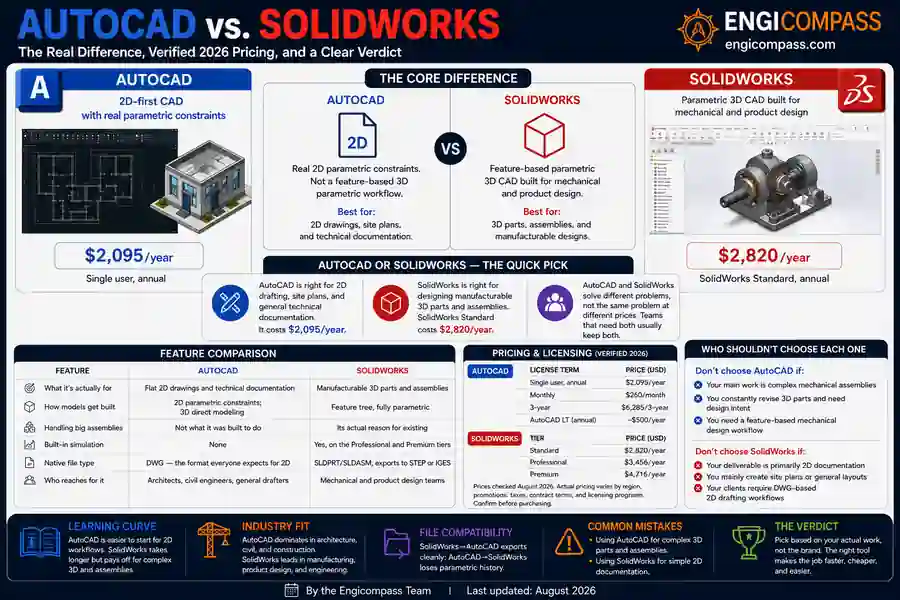
AutoCAD vs SolidWorks isn’t really a fair fight, because the two tools aren’t built for the same job. AutoCAD is a 2D drafting tool that can do 3D. SOLIDWORKS is a parametric 3D tool built for manufacturing that can also produce 2D drawings. Once you know which job you actually have, the pick gets easy.
Quick answer:
- Need 2D drawings, site plans, or general drafting across many trades: AutoCAD ($2,095/year).
- Need to design manufacturable parts and assemblies: SOLIDWORKS Standard ($2,820/year).
- Doing both regularly: expect to own both, not pick one — they solve different problems.
By the Engicompass Team · Last updated: August 2026
What’s the core difference between AutoCAD and SolidWorks?
AutoCAD started as a 2D drafting tool in 1982, and 2D is still what most people use it for. It can build 3D geometry too, but that geometry is direct-modeled, not parametric. The software doesn’t track why a shape looks the way it does, only its current form. Change one dimension, and you often redraw by hand rather than watch related features update on their own.
Why SolidWorks works differently
SOLIDWORKS is parametric from the ground up. Every part is built from a list of features and dimensions, applied in order. Change a hole diameter, and every feature that depends on it updates automatically. This is the same distinction covered in the CAD pillar guide. It’s the single biggest reason AutoCAD vs SolidWorks isn’t a close call once you know your actual job: one tracks design intent, the other tracks a current shape.
That difference decides which tool fits your actual work. Flat technical drawings, site plans, and general drafting stay AutoCAD’s strength. Parts and assemblies that need to survive dozens of revisions belong in SOLIDWORKS.
How do AutoCAD and SolidWorks compare, feature by feature?
| AutoCAD | SolidWorks | |
|---|---|---|
| What it’s actually for | Flat 2D drawings and technical documentation | Manufacturable 3D parts and assemblies |
| How models get built | Push-pull direct editing, drafting-first | Feature tree, fully parametric |
| Handling big assemblies | Not what it was built to do | Its actual reason for existing |
| Built-in simulation | None | Yes, on the Professional and Premium tiers |
| Native file type | DWG — the format everyone expects for 2D | SLDPRT/SLDASM, exports to STEP or IGES |
| Who reaches for it | Architects, civil engineers, general drafters | Mechanical and product design teams |
That table looks close on paper — both handle 2D, both handle 3D, both export common formats. The real gap sits in the “modeling type” row, and it’s bigger than it looks. AutoCAD’s 3D tools exist and work, but every edit is manual. SolidWorks tracks the relationships between features, so one change ripples through the whole model correctly. For a one-off sketch, that difference barely matters. For a part that gets revised forty times before it ships, it’s the entire reason SolidWorks exists.
Assembly handling follows the same pattern. AutoCAD can technically hold multiple objects in one file, but it has no real concept of an assembly. There’s no mate constraints, no interference checking, no way to see if two parts collide when one moves. SolidWorks was built around exactly that problem.
AutoCAD vs SolidWorks: what’s the actual cost?
Both figures below come straight from each vendor’s own current pricing page, not a third-party estimate.
| Software | Tier | Verified price | Notes |
|---|---|---|---|
| AutoCAD | Single user, annual | $2,095/year | Confirmed on autodesk.com; $260/month or $6,285/3-year also offered |
| AutoCAD LT | 2D-only version | ~$500/year | Cheaper option if you never need AutoCAD’s 3D or automation tools |
| SolidWorks | Standard | $2,820/year | Confirmed on solidworks.com |
| SolidWorks | Professional | $3,456/year | Adds simulation and advanced tools |
| SolidWorks | Premium | $4,716/year | Adds advanced simulation and surfacing |
Neither vendor sells a perpetual license anymore for the subscriptions above; both moved to subscription-only years ago. SOLIDWORKS still offers a perpetual option separately. It starts around $4,195 upfront plus roughly $1,095/year in maintenance — worth it only if you plan to keep a seat for several years.
Both prices climb most years, not just occasionally. AutoCAD’s list price has risen roughly 37% since 2020, driven by Autodesk’s standard annual increases in the 5–8% range. Budget for that trajectory on either tool if you’re planning past a single renewal cycle, not just today’s sticker number.
Both vendors let you try before you commit. AutoCAD offers a self-serve 30-day free trial straight from Autodesk’s website. SolidWorks trials typically run through a local reseller rather than a direct download, so budget an extra step to get access.
Which one has the steeper learning curve?
Both take real work to learn, and the work looks nothing alike. AutoCAD’s 2D drafting commands are simple to pick up. Its 3D tools take longer, and most users never touch them at all. SolidWorks takes longer to learn overall, because parametric modeling itself is a different way of thinking about a design, not just a new toolbar.
New hires often already know one or the other from school, which matters more than either tool’s raw difficulty. Check what a candidate actually used in their coursework before assuming a learning curve you’ll need to plan around.
Which industries actually prefer which tool?
AutoCAD dominates general drafting: civil engineering, construction documentation, architecture, and any role that mostly produces 2D drawings. A civil engineer laying out a site plan, an architect drafting a floor plan, a facilities team documenting a building — all of that work usually happens in AutoCAD. The deliverable is a flat, precise drawing, not a manufacturable object.
SOLIDWORKS dominates mechanical and product design: anything that gets manufactured, molded, or machined. A mechanical engineer designing a gearbox housing, a product designer building a consumer device, a manufacturing team documenting an assembly for the shop floor — all of that lives in SolidWorks. The model itself needs to track how the design changes, which is the whole point of choosing it over AutoCAD.
The overlap is smaller than people expect. A civil engineer rarely needs SOLIDWORKS. A mechanical engineer designing parts rarely needs AutoCAD as their primary tool, though many still keep it around for the occasional 2D layout or handoff to a client who expects a DWG file.
Do AutoCAD and SolidWorks files work together?
Not cleanly, and it’s worth knowing exactly where the gap sits before you rely on either tool to read the other’s work.
SolidWorks can import a DWG file from AutoCAD, either as a flat reference underneath a new 3D model or as a starting sketch to build features on top of. What it can’t do is pull in any parametric intelligence. AutoCAD’s file never had any to begin with — you’re importing lines and geometry, not a feature tree.
Going the other direction works better. SolidWorks can export a 2D drawing straight to DWG format, and that file opens in AutoCAD looking like any other AutoCAD drawing, since DWG is AutoCAD’s native format either way. What doesn’t survive that export is the 3D model or any of the parametric history behind it — AutoCAD only ever sees the flat output.
The practical result for anyone weighing AutoCAD vs SolidWorks file exchange: treat it as one-way for anything that matters. Send finished 2D drawings from SolidWorks to AutoCAD freely. Don’t expect to send a DWG file into SolidWorks and get a real parametric model back out.
AutoCAD vs SolidWorks: the actual verdict
If your job is 2D drafting, plans, or documentation, get AutoCAD. Don’t buy SOLIDWORKS for this. You’d be paying more for parametric 3D power you won’t use, and DWG stays the file format most collaborators expect regardless. A civil engineer producing site plans, an architect drafting floor plans, or anyone whose deliverable is fundamentally a flat drawing fits squarely here.
If your job is designing parts or assemblies that get manufactured, get SOLIDWORKS. AutoCAD’s lack of native parametric modeling makes it a poor fit for anything that needs to survive real design revisions. A mechanical engineer designing a bracket that goes through a dozen tolerance changes before production needs the feature tree SolidWorks tracks automatically. Redoing that work by hand in AutoCAD costs real time on every single revision.
If you genuinely need both — say, mechanical design plus site documentation — don’t force one tool to do the other’s job. Budget for both licenses. Trying to make AutoCAD handle parametric assembly work, or SolidWorks handle general 2D drafting, costs more in wasted time than the second subscription does. A combined AutoCAD plus SolidWorks Standard budget runs about $4,915/year for one seat of each. That’s still cheaper than the hours lost forcing either tool outside its actual strength.
If you’re not sure which camp you’re in yet, look at your deliverables, not your title. Count what you actually produce in a typical month. Whichever one comes out ahead — flat drawings or 3D manufacturable parts — points straight at the right tool, regardless of what your job title happens to say.
FAQ
Can AutoCAD do everything SolidWorks does? No. AutoCAD can build 3D shapes, but without parametric history, so edits don’t propagate the way they do in SolidWorks. For any design that changes repeatedly through revisions, that gap becomes a real cost, not a minor inconvenience.
Is SolidWorks better than AutoCAD? Neither is better in general — they’re built for different jobs. SolidWorks is the stronger tool specifically for parametric 3D mechanical design. AutoCAD is the stronger tool specifically for 2D drafting and documentation.
Can I open AutoCAD files in SolidWorks, or the other way around? SolidWorks can import DWG files for reference or as a starting sketch, but it won’t gain parametric history from a flat AutoCAD drawing. Going the other way, SolidWorks can export flat 2D drawings that open cleanly in AutoCAD.
Do I need both if I work in mechanical design? Often, yes, in a smaller role than you’d expect. Many mechanical teams use SOLIDWORKS for the actual design work and keep AutoCAD around only for specific 2D layouts or client deliverables that still expect a DWG file.
Which one should a student learn first? Match it to your target discipline, not to which one seems more popular. Civil or architecture-leaning students get more direct value from AutoCAD; mechanical or product-design students get more direct value from SolidWorks. Both offer free student licensing, so cost isn’t the deciding factor either way.
Is AutoCAD cheaper than SolidWorks? Yes, by a real margin — $2,095/year against $2,820/year for the base tiers, and AutoCAD LT drops that to roughly $500/year if you only need 2D. But price alone isn’t the right way to compare AutoCAD vs SolidWorks. They’re not competing for the same job, so “cheaper” only matters once you’ve already confirmed the cheaper tool actually does what you need.
Can I switch from AutoCAD to SolidWorks later without starting over? Geometry moves across as flat, dumb solids at best — expect to rebuild any part as a real parametric feature tree once it’s in SolidWorks, rather than assume the AutoCAD file carries useful history with it. Treat it as a fresh model built with AutoCAD’s drawing as a visual reference, not a real starting point.